Development scenarios
The scenarios below show the code for common tasks: setting up a standalone program, working with models, catalogs and solutions, running the threat elicitation and risk analysis, and processing the results. The standalone libraries and the Eclipse plug-ins contain the same classes, so the code is the same in both cases, except for the setup of a standalone program. Each scenario mentions the library and the plug-in it needs; SPARTA Standalone libraries lists which plug-in each library brings in.
The scenarios focus on the code.
The classes and their behavior are described in SPARTA Java API, and a complete program that combines the scenarios is shown in Example project.
The snippets are written for SPARTA 2026.0 and were compiled and run against the 2026.0.0 libraries.
They import the SPARTA classes one by one; with a wildcard import, the name Process is ambiguous (see Meta-model).
Setting up a standalone program
This scenario shows the initialization that a standalone Java program needs before it can create, load or save SPARTA models.
EMF must know the SPARTA meta-model and the resource factory that reads and writes .sparta files.
Note
Requires sparta-model.
In an Eclipse plug-in, this initialization is not needed.
The be.kuleuven.cs.distrinet.sparta.spartamodel plug-in declares the meta-model and the resource factory (for .sparta and .securitydfd files) in its plugin.xml, and Eclipse registers them in EMF when it starts.
In a standalone program there is no such mechanism, so you register them yourself.
Add the SPARTA libraries to your Maven project as described in Standalone Prerequisites. Then run the following code before first use, once per JVM.
 1import org.eclipse.emf.ecore.resource.Resource;
 2
 3import be.kuleuven.cs.distrinet.sparta.spartamodel.SpartaModelPackage;
 4import be.kuleuven.cs.distrinet.sparta.spartamodel.util.SpartaModelResourceFactoryImpl;
 5
 6// Initialization: register the SPARTA meta-model
 7SpartaModelPackage.eINSTANCE.eClass();
 8
 9// Register resource factory for .sparta files
10Resource.Factory.Registry.INSTANCE.getExtensionToFactoryMap().put("sparta", new SpartaModelResourceFactoryImpl());
Both steps are required:
Without the first step, loading a model fails with a
PackageNotFoundExceptionfor the packagehttp://distrinet.cs.kuleuven.be/spartamodel.Without the second step, loading or creating a
.spartaresource fails because no resource factory is registered. To also read files with the older extension.securitydfd, register the same factory forsecuritydfd.
The threat elicitation engine needs no additional VIATRA initialization: the Engine constructor takes care of it.
Models, catalogs and solutions
Creating DFD models
This scenario creates a small DFD model of a web shop in code: a trust boundary with a web server process and a database, an external entity, and two data flows. The later scenarios reuse this model.
Note
Requires sparta-model (Maven) or the be.kuleuven.cs.distrinet.sparta.spartamodel plug-in (Eclipse).
All elements for a SPARTA model can be created using the SpartaModelFactory; use its singleton instance SpartaModelFactory.eINSTANCE.
The model is hierarchically structured.
Elements that can contain other elements (e.g., the DFDModel, TrustBoundaryContainers) have a containedElements list to which the other elements have to be added.
A DataFlow connects a sender and a recipient, which you set with setSender and setRecipient.
 1import java.util.List;
 2
 3import be.kuleuven.cs.distrinet.sparta.spartamodel.DFDModel;
 4import be.kuleuven.cs.distrinet.sparta.spartamodel.DataFlow;
 5import be.kuleuven.cs.distrinet.sparta.spartamodel.DataStore;
 6import be.kuleuven.cs.distrinet.sparta.spartamodel.ExternalEntity;
 7import be.kuleuven.cs.distrinet.sparta.spartamodel.ModelElement;
 8import be.kuleuven.cs.distrinet.sparta.spartamodel.Process;   // not java.lang.Process
 9import be.kuleuven.cs.distrinet.sparta.spartamodel.SpartaModelFactory;
10import be.kuleuven.cs.distrinet.sparta.spartamodel.TrustBoundaryContainer;
11
12SpartaModelFactory fact = SpartaModelFactory.eINSTANCE;
13
14DFDModel dfd = fact.createDFDModel();
15dfd.setName("Webshop");
16List<ModelElement> elements = dfd.getContainedElements();
17
18TrustBoundaryContainer backend = fact.createTrustBoundaryContainer();
19backend.setName("Backend");
20elements.add(backend);
21
22Process webServer = fact.createProcess();
23webServer.setName("Web server");
24backend.getContainedElements().add(webServer);
25
26DataStore database = fact.createDataStore();
27database.setName("Database");
28backend.getContainedElements().add(database);
29
30ExternalEntity user = fact.createExternalEntity();
31user.setName("User");
32elements.add(user);
33
34DataFlow request = fact.createDataFlow();
35request.setName("request");
36request.setSender(user);
37request.setRecipient(webServer);
38elements.add(request);
39
40DataFlow query = fact.createDataFlow();
41query.setName("query");
42query.setSender(webServer);
43query.setRecipient(database);
44elements.add(query);
The meta-model concepts and their properties are described in Advanced concepts in SPARTA.
Saving DFD models
This scenario saves the model from Creating DFD models to a .sparta file.
Note
Requires sparta-model (Maven) or the be.kuleuven.cs.distrinet.sparta.spartamodel plug-in (Eclipse).
The SPARTA DFD models are saved as EMF resources, in files with the extension .sparta.
Caution
The EMF Resource concept to save files is different from the SpartaResource concept in SPARTA which represents any type of useful resource such as security and privacy solution catalogs and threat type catalogs that you may want to load into the DFD model.
 1import java.io.File;
 2import java.util.Collections;
 3
 4import org.eclipse.emf.common.util.URI;
 5import org.eclipse.emf.ecore.resource.Resource;
 6import org.eclipse.emf.ecore.resource.ResourceSet;
 7import org.eclipse.emf.ecore.resource.impl.ResourceSetImpl;
 8import org.eclipse.emf.ecore.xmi.XMLResource;
 9
10// Obtain a new resource set
11ResourceSet resourceSet = new ResourceSetImpl();
12
13// create a resource
14Resource resource = resourceSet.createResource(URI.createFileURI(new File("webshop.sparta").getAbsolutePath()));
15
16// add the model
17resource.getContents().add(dfd);
18
19// save the resource to disk (throws IOException)
20resource.save(Collections.singletonMap(XMLResource.OPTION_ENCODING, "UTF-8"));
Without save options (resource.save(null)), the file is written with the ASCII encoding, and non-ASCII characters in names are stored as character references.
The UTF-8 option above avoids this.
Loading DFD models
This scenario loads a model from a .sparta file, together with the catalogs and other files that the model refers to.
Note
Requires sparta-model (Maven) or the be.kuleuven.cs.distrinet.sparta.spartamodel plug-in (Eclipse).
 1import java.io.File;
 2
 3import org.eclipse.emf.common.util.URI;
 4import org.eclipse.emf.ecore.resource.Resource;
 5import org.eclipse.emf.ecore.resource.ResourceSet;
 6import org.eclipse.emf.ecore.resource.impl.ResourceSetImpl;
 7import org.eclipse.emf.ecore.util.EcoreUtil;
 8
 9import be.kuleuven.cs.distrinet.sparta.spartamodel.DFDModel;
10
11ResourceSet resourceSet = new ResourceSetImpl();
12Resource resource = resourceSet.getResource(URI.createFileURI(new File("webshop.sparta").getAbsolutePath()), true);
13// also load the catalogs that the model refers to
14EcoreUtil.resolveAll(resourceSet);
15DFDModel dfd = (DFDModel) resource.getContents().get(0);
getResource(uri, true) loads the file immediately, so there is no need to call resource.load(...) afterwards.
EcoreUtil.resolveAll loads the files that the model refers to, such as linked threat type catalogs, into the same resource set.
Pairing existing threat type catalogs
Ideally, a model already links to the threat type catalog to use for the threat elicitation. This scenario shows how to add an existing catalog to a model that does not: first only for the analysis, by loading the catalog into the same resource set, and then permanently, by linking it to the model and saving the model.
Note
Requires sparta-model (Maven) or the be.kuleuven.cs.distrinet.sparta.spartamodel plug-in (Eclipse).
First, load the model (see Loading DFD models) and the existing threat type catalog into the same resource set.
1Resource catalogResource = resourceSet.getResource(
2        URI.createFileURI(new File("stride-per-interaction.sparta").getAbsolutePath()), true);
At this point, the catalog is available to an Engine that you create for this resource set (see Threat elicitation and risk analysis).
The ThreatAnalysis view in Eclipse, however, only uses the catalogs that the model links to.
To make the pairing permanent, link the catalog to the model and save the model.
1import be.kuleuven.cs.distrinet.sparta.spartamodel.ThreatTypeCatalog;
2
3// for every threat type catalog, add it to the DFDModel's resource list
4catalogResource.getContents().stream()
5        .filter(ThreatTypeCatalog.class::isInstance)
6        .map(ThreatTypeCatalog.class::cast)
7        .forEach(dfd.getResource()::add);
8
9resource.save(Collections.singletonMap(XMLResource.OPTION_ENCODING, "UTF-8"));
Note
Note the dfd.getResource() which gets the DFDModel’s resource list of SpartaResource elements.
This is different from the EMF resources.
The ThreatTypeCatalog (be.kuleuven.cs.distrinet.sparta.spartamodel.ThreatTypeCatalog) is added to this list.
The list only refers to the catalog: the catalog is not copied into the model file.
The saved model refers to the catalog file with a path relative to the model file, so keep the catalog next to the model, or at the same relative location.
Threat type catalogs are available online (see Installing SPARTA); Creating threat type catalogs explains how to create your own.
Creating and applying solutions
This scenario creates a solution type with one role and one countermeasure against spoofing, stores it in a solution type catalog, and applies it to the web server of the model from Creating DFD models.
Note
Requires sparta-model (Maven) or the be.kuleuven.cs.distrinet.sparta.spartamodel plug-in (Eclipse).
A security or privacy solution consists of a SolutionType, usually stored in a SolutionTypeCatalog, and a Solution in the DFD model that applies it. The SolutionType defines Roles and CounterMeasures; the Solution contains a RoleBinding for each role it binds to a concrete model element. These concepts are explained in Concepts used in SPARTA, and how countermeasures reduce the risk in Which countermeasures apply.
The code below uses fact, dfd and webServer from Creating DFD models, and the model’s resource and resourceSet from Saving DFD models.
The countermeasure refers to the threat types it mitigates by ID (stride.spoofing is the ID of the Spoofing group in the published STRIDE catalogs); alternatively, add the threat types themselves with cm.getMitigates().add(...).
 1import be.kuleuven.cs.distrinet.sparta.spartamodel.CounterMeasure;
 2import be.kuleuven.cs.distrinet.sparta.spartamodel.Estimate;
 3import be.kuleuven.cs.distrinet.sparta.spartamodel.Role;
 4import be.kuleuven.cs.distrinet.sparta.spartamodel.SolutionType;
 5import be.kuleuven.cs.distrinet.sparta.spartamodel.SolutionTypeCatalog;
 6
 7// The solution type: one role, and a countermeasure that protects that role
 8SolutionType authentication = fact.createSolutionType();
 9authentication.setName("Authentication");
10
11Role authenticated = fact.createRole(Process.class);   // the role can be bound to processes
12authenticated.setName("Authenticated process");
13authentication.getRoles().add(authenticated);
14
15CounterMeasure cm = fact.createCounterMeasure();
16cm.setName("Authenticate requests");
17cm.getMitigatedThreatTypeID().add("stride.spoofing");
18cm.getSubject().add(authenticated);                    // the role that the countermeasure protects
19
20Estimate difficulty = fact.createEstimate();
21difficulty.setMinimum(20);
22difficulty.setProbable(40);
23difficulty.setMaximum(60);
24difficulty.setConfidence(4);
25cm.setDifficulty(difficulty);
26authentication.getCountermeasure().add(cm);
27
28// Store the solution type in a solution type catalog, in its own file, and link it to the model
29SolutionTypeCatalog solutions = fact.createSolutionTypeCatalog();
30solutions.setName("Solutions");
31solutions.getSolutionTypes().add(authentication);
32Resource solutionResource = resourceSet.createResource(
33        URI.createFileURI(new File("solutions.sparta").getAbsolutePath()));
34solutionResource.getContents().add(solutions);
35dfd.getResource().add(solutions);
Always give a countermeasure a difficulty, with a minimum that is lower than the maximum. A missing difficulty, or one whose minimum equals its maximum, produces no valid samples: if it is the only applicable countermeasure, no attack succeeds; otherwise SPARTA ignores it (see Defaults when information is missing).
 1import be.kuleuven.cs.distrinet.sparta.spartamodel.RoleBinding;
 2import be.kuleuven.cs.distrinet.sparta.spartamodel.Solution;
 3
 4Solution solution = fact.createSolution();
 5solution.setName("Web server authentication");
 6solution.setSecuritypattern(authentication);           // the solution type it applies
 7
 8RoleBinding binding = fact.createRoleBinding();
 9binding.setBinds(authenticated);                       // the role
10binding.setBindsTo(webServer);                         // the element that plays the role
11solution.getRolebinding().add(binding);
12dfd.getContainedElements().add(solution);
13
14solutionResource.save(Collections.singletonMap(XMLResource.OPTION_ENCODING, "UTF-8"));
15resource.save(Collections.singletonMap(XMLResource.OPTION_ENCODING, "UTF-8"));
A role binding binds one role to one element: setBindsTo takes a single Asset (a DFD element or a data type).
Bind each role of the solution with its own RoleBinding.
Note
It is not that trivial to correctly instantiate security or privacy solutions in general. The API does not check the result: nothing requires a binding for every role, and the element does not have to match the role’s binding types (only the editors restrict the choices). The risk calculation does not look at the solution type either: it only follows the role bindings of the threatened element and of the threat’s data flow.
When you run the analysis again after applying the solution (see Performing threat elicitation and risk analysis), the risk of the spoofing threats on the web server drops, while their potential risk stays the same.
Threat analysis and results
Performing threat elicitation and risk analysis
This scenario runs the threat elicitation and risk analysis on a model and its threat type catalogs, and obtains the elicited threats with their risk.
Note
Requires sparta-core (Maven) or the be.kuleuven.cs.distrinet.sparta.core and be.kuleuven.cs.distrinet.sparta.queries plug-ins (Eclipse).
Caution
The engine does not have a fixed built-in catalog of threat types. The threat elicitation will only work when a catalog of threat types is provided to the engine as part of the analyzed resource set. See Pairing existing threat type catalogs for more information on how to pair an existing catalog of threat types to a model.
Using the previously loaded or saved resourceSet:
 1import java.util.List;
 2
 3import be.kuleuven.cs.distrinet.sparta.core.Engine;
 4import be.kuleuven.cs.distrinet.sparta.core.model.Threat;
 5
 6// Create a new engine for the resource set that contains the model and the catalogs
 7Engine engine = new Engine(resourceSet);
 8// Run the threat elicitation and the risk analysis
 9List<Threat> threats = engine.runAnalysis(resourceSet);
10// use the results
11...
12// release the engine when you no longer need it
13engine.dispose();
runAnalysis(ResourceSet) elicits the threats of the catalogs in the resource set, calculates their risk, and returns the threats.
Pass the same resource set as to the constructor.
The other variants of runAnalysis, the scope of the engine and the risk calculation are described in Threat elicitation and risk analysis.
Some points to keep in mind:
The risk is calculated when you call
runAnalysis. After you change the model, for example by applying a solution, callrunAnalysisagain to get updated risk values.If the model contains no attacker profiles or estimates, SPARTA uses defaults (see Defaults when information is missing).
The engine prints some output of its own to the console, such as VIATRA warnings about recursive helper patterns of the STRIDE catalogs.
Note
In 2026.0, every threat must have a data flow: a catalog pattern that binds no data flow (for example the patterns of a STRIDE-per-element catalog) makes the analysis fail with a NullPointerException (see Threat elicitation and risk analysis).
Reading threat results
This scenario goes through the elicited threats and reads, for each threat, what it is, where it occurs in the model, and its risk.
Note
Requires sparta-core (Maven) or the be.kuleuven.cs.distrinet.sparta.core plug-in (Eclipse).
 1import be.kuleuven.cs.distrinet.sparta.spartamodel.DFDElement;
 2import be.kuleuven.cs.distrinet.sparta.spartamodel.ThreatType;
 3
 4for (Threat t : threats) {
 5    String type = t.getThreatTypeName();             // for example "Spoofing"
 6    String name = t.getThreatName();                 // for example "Web server spoofed"
 7    ThreatType threatType = t.getThreatType();       // the matched threat type in the catalog
 8    DFDElement location = t.getThreatenedElement();  // the threatened element
 9    DataFlow flow = t.getDataFlow();                 // the data flow of the interaction
10    ModelElement from = t.getDataFlowFrom();         // the sender of that data flow
11    ModelElement to = t.getDataFlowTo();             // the recipient of that data flow
12
13    double risk = t.getRisk();                       // expected residual risk
14    double riskLower = t.getRisk_lower();
15    double riskUpper = t.getRisk_upper();
16    double potentialRisk = t.getPotentialRisk();     // risk without countermeasures
17    double vulnerability = t.getVulnerability();
18}
For threats from the patterns in a catalog, getThreatTypeName(), getThreatName() and getDescription() are the Type, Name and Description of the threat in the ThreatAnalysis view.
getThreatType().getName() is the raw name in the catalog, which can contain placeholders such as <$location$> spoofed.
Convenience methods such as getThreatenedElementName(), getThreatenedElementTypeName(), getDataFlowName(), getDataFlowFromName() and getDataFlowToName() return the names as strings.
All getters, the differences for threats from legacy key-based threat types, and the meaning of the risk values are described in Threat elicitation and risk analysis.
Analyzing threat results
This scenario computes aggregated figures over all elicited threats, such as the number of threats, the total risk and the risk reduction, and figures per threat type and per element type.
Note
Requires sparta-analysis (Maven) or the be.kuleuven.cs.distrinet.sparta.threatanalysis plug-in (Eclipse).
The Java package is be.kuleuven.cs.distrinet.sparta.analysis.
 1import java.util.Map;
 2
 3import be.kuleuven.cs.distrinet.sparta.analysis.ThreatAggregationAnalysis;
 4
 5ThreatAggregationAnalysis taa = new ThreatAggregationAnalysis(threats);
 6long threatCount = taa.getThreatCount();
 7double totalRisk = taa.getTotalRisk();
 8double reduction = taa.getTotalRiskReductionPct();   // fraction between 0 and 1 (NaN without potential risk)
 9Map<ThreatType, Long> perThreatType = taa.getThreatCountPerThreatType();
10Map<Class<? extends ModelElement>, Long> perElementType = taa.getThreatCountPerModelElementType();
11Map<Class<? extends ModelElement>, Double> potentialRiskPerElementType = taa.getPotentialRiskPerModelElementType();
12Double average = taa.getAverageThreatCounterPerElement();
13// etc.
All available aggregates and the keys of the maps are described in Aggregated risk analyses.
Exporting threat results
This scenario exports the elicited threats in each of the formats that SPARTA supports: CSV (with the default columns or your own), one text file per threat, JSON, a LaTeX report and XLSX.
Note
Requires sparta-io (Maven) or the be.kuleuven.cs.distrinet.sparta.io plug-in (Eclipse).
The classes are in the package be.kuleuven.cs.distrinet.sparta.io; Exporters lists the columns and formats of each writer.
1import java.io.BufferedWriter;
2import java.io.FileWriter;
3
4import be.kuleuven.cs.distrinet.sparta.io.ThreatCSVWriter;
5
6try (ThreatCSVWriter writer = new ThreatCSVWriter(new BufferedWriter(new FileWriter("threats.csv")))) {
7    writer.writeHeader();
8    writer.write(threats.toArray(new Threat[0]));
9}
To choose the columns yourself, pass a map from column header to value:
 1import java.util.LinkedHashMap;
 2import java.util.function.Function;
 3
 4Map<String, Function<Threat, ? extends Object>> columns = new LinkedHashMap<>();
 5columns.put("Category", Threat::getThreatTypeName);
 6columns.put("Threat", Threat::getThreatName);
 7columns.put("Element", Threat::getThreatenedElement);
 8columns.put("Risk", Threat::getRisk);
 9try (ThreatCSVWriter writer = new ThreatCSVWriter(new BufferedWriter(new FileWriter("threats-short.csv")), columns)) {
10    writer.writeHeader();
11    writer.write(threats.toArray(new Threat[0]));
12}
 1import java.io.File;
 2
 3import be.kuleuven.cs.distrinet.sparta.io.ThreatTextWriter;
 4
 5File dir = new File("threats");
 6dir.mkdirs();
 7for (Threat t : threats) {
 8    File file = new File(dir, ThreatTextWriter.fileNameSuggestion(t));
 9    try (ThreatTextWriter writer = new ThreatTextWriter(new BufferedWriter(new FileWriter(file)))) {
10        writer.write(t);
11    }
12}
fileNameSuggestion builds the file name from the raw threat type name, the threatened element and the data flow.
Threats with the same threat type, element and data flow get the same file name, so one file overwrites the other.
1import java.util.ArrayList;
2
3import be.kuleuven.cs.distrinet.sparta.core.model.IInteractionThreat;
4import be.kuleuven.cs.distrinet.sparta.io.ThreatJsonWriter;
5
6try (ThreatJsonWriter<IInteractionThreat> writer = new ThreatJsonWriter<>(
7        new BufferedWriter(new FileWriter("threats.json")), IInteractionThreat.class)) {
8    writer.writePretty(new ArrayList<IInteractionThreat>(threats));
9}
1import be.kuleuven.cs.distrinet.sparta.io.ReportWriter;
2
3new ReportWriter().performExport(new File("report"), resourceSet, threats);
The report is the same LaTeX report as the one exported from the ThreatAnalysis view (see Analysis results and exports).
performExport does not overwrite an existing report.tex or introduction.tex in the directory; it writes report-empty.tex or introduction-empty.tex instead.
1import java.io.FileOutputStream;
2
3import be.kuleuven.cs.distrinet.sparta.io.ThreatXlsxOutputStream;
4
5try (ThreatXlsxOutputStream out = new ThreatXlsxOutputStream(new FileOutputStream("threats.xlsx"))) {
6    out.write(threats.toArray(new Threat[0]));
7}
Warning
With the dependencies that sparta-io 2026.0.0 brings in, the XLSX export fails with java.lang.NoClassDefFoundError: org/apache/poi/util/POILogFactory.
The workaround, adding poi-ooxml 5.4.1 and commons-io 2.18.0 to your project, is described in Known limitation: XLSX export.
Extending the meta-model in Eclipse
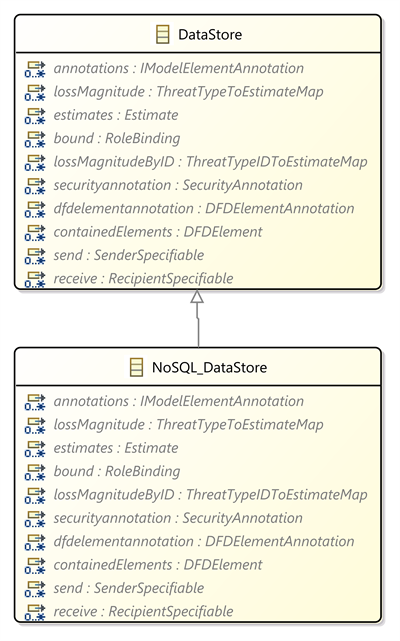
This scenario adds a new concept to the SPARTA meta-model in an Eclipse modeling project: a NoSQL_DataStore that extends DataStore, and that you can then add to a DFD model in the SPARTA Model Editor.
How SPARTA supports such extensions is described in the extension hooks of SPARTA in Eclipse.
Follow these steps:
Install the SPARTA plug-ins in Eclipse via , using the SPARTA update site (see Installing SPARTA). Use an Eclipse IDE that contains EMF, EcoreTools and the Plug-in Development Environment, such as the Eclipse IDE for Eclipse Modeling Tools 2025-06.
Create a new Ecore Modeling Project (, then select Ecore Modeling Project in the category Eclipse Modeling Framework).
Add the SPARTA meta-model as a dependency for your project: open
META-INF/MANIFEST.MF, and on the Dependencies tab click Add… next to Required Plug-ins and selectbe.kuleuven.cs.distrinet.sparta.spartamodel.Add the
spartamodel.ecoreandspartamodel.genmodelresources to the Models of the.airdfile. Both files are included in thebe.kuleuven.cs.distrinet.sparta.spartamodelplug-in, in itsmodelfolder. Open the.airdfile, click Add… in the Models section, and enter the URI of one file in the dialog Select resources to add. Repeat this for the other file:platform:/plugin/be.kuleuven.cs.distrinet.sparta.spartamodel/model/spartamodel.ecore platform:/plugin/be.kuleuven.cs.distrinet.sparta.spartamodel/model/spartamodel.genmodel
Model your extension using the standard EMF workflow. For example, create a new class
NoSQL_DataStoreand add the existing DataStore element as a supertype. The Ecore tree editor does not use the models of the.airdfile: before you choose the supertype there, right-click in the editor, select Load Resource… and enter the URI ofspartamodel.ecore. Otherwise, the ESuper Types dialog does not offer DataStore.
Add the SPARTA generator model as a reference in your generator model. Right-click your generator model (
your_project > model > your_model.genmodel), select Reload…, choose Ecore model and click Next. Click Load and Next. On the Package Selection page, select only your own package under Root packages (clearspartamodel), and under Referenced generator models, select the SPARTA generator model (.../be.kuleuven.cs.distrinet.sparta.spartamodel/model/spartamodel.genmodel) and its packagebe.kuleuven.cs.distrinet.sparta.spartamodel. Click Finish. The generator model then listsSpartaModelnext to your own package.In the
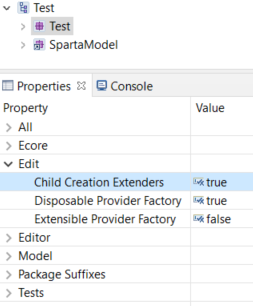
.genmodeltree editor, select the package of your extension (not the top level element). In the properties, underEdit, set theChild Creation Extendersproperty totrue. (Note: if the new model extension should also be extensible similar to thespartamodel, also set theExtensible Provider Factoryproperty totrue.)
Generate the model by right-clicking the root of the genmodel and selecting Generate All.
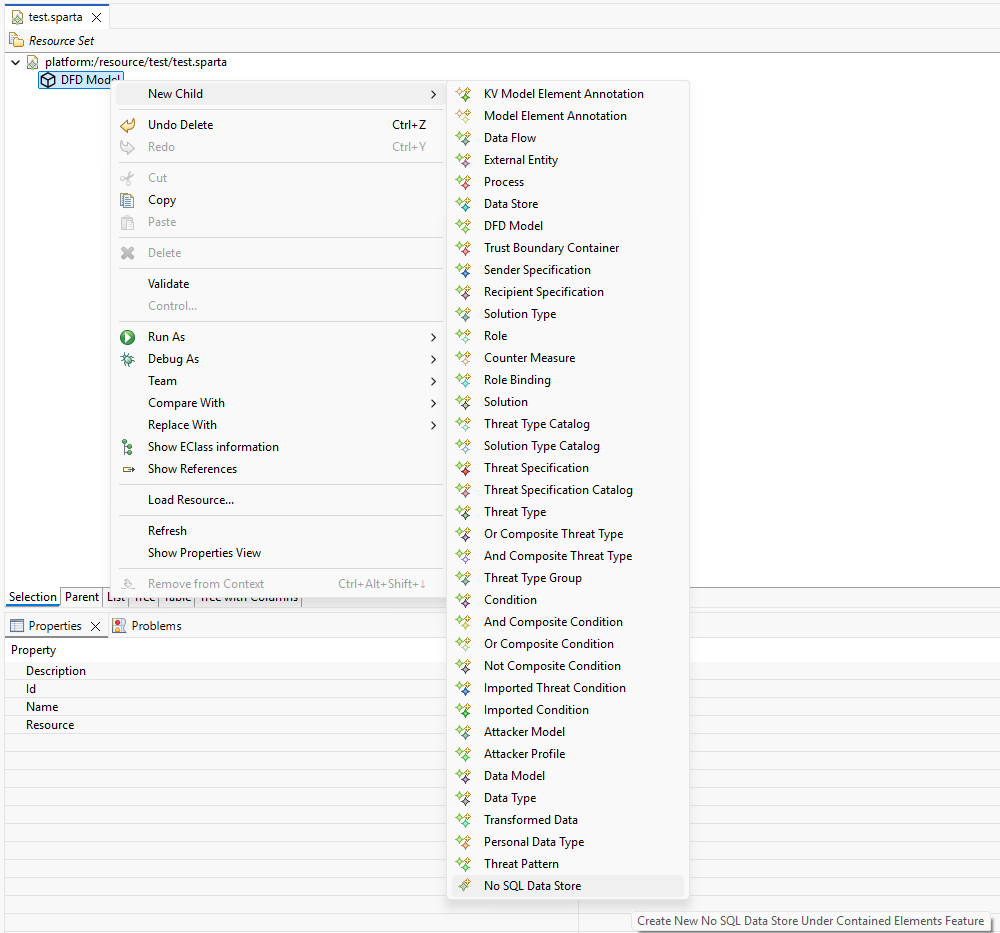
Now, when you run your project as an Eclipse Application (), you can add a NoSQL_DataStore to a DFD Model in the SPARTA Model Editor: right-click the DFD Model and select .
This works because the SPARTA generator model itself enables Child Creation Extenders and Extensible Provider Factory, so that extensions can contribute new children to SPARTA elements.